The ROI of Game-Based Learning: Investing in Employee Experience Drives Business Growth

Emotional Engagement System
Release Notes
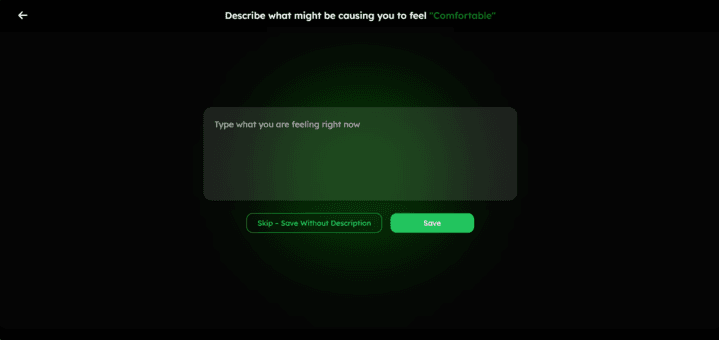
This feature is an in-game Emotional Engagement System that continuously captures how players feel as they move through a 365‑day game experience. Its core purpose is to build self-awareness and emotional maturity by transforming “how I feel right now” into structured data that can be visualized and reflected upon over time.
Core Emotional Model
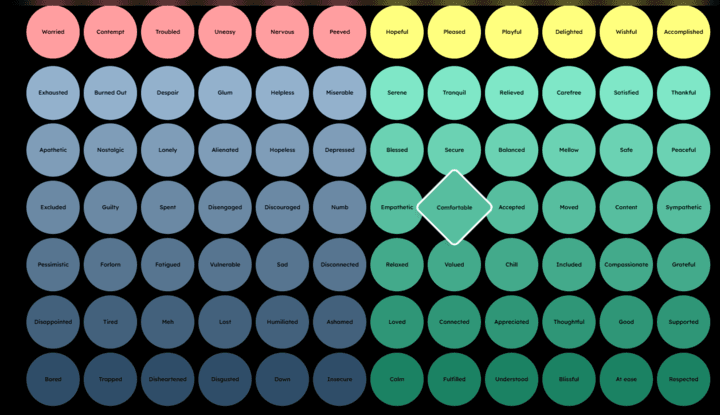
This feature utilizes a simple yet powerful four-quadrant model based on energy and pleasantness.
- High Energy Unpleasant
- High Energy Pleasant
- Low Energy Unpleasant
- Low Energy Pleasant
Players always start by choosing one of these four states, which keeps the interaction fast while still capturing meaningful emotional direction. From there, the system can map into a richer taxonomy (e.g., more specific emotions inside each quadrant) without overwhelming the player.
In‑Game Emotional Check‑ins
Emotion capture is tightly integrated into gameplay, especially around “disaster” or high‑impact events. After an event, a short delay (for example, 2 seconds) gives players space to react, then the “How do you Feel” UI appears as a circular four‑quadrant widget in landscape mode.
Key characteristics of the check‑in flow:
- Non‑intrusive, fast interaction to avoid breaking immersion.
- Always bound to a specific context (which event, at what time, for which player).
- Works both when triggered automatically by the game and when triggered remotely by a facilitator.
Data Capture and Reliability
Every emotional check‑in is logged as structured data, tied to the player, the session, and the game event. The system is designed for:
- High reliability of submissions (no lost check‑ins).
- Real‑time writes are suitable for live dashboards.
- Batch analytics that can aggregate emotions over days, weeks, and the full 365‑day arc.
This turns momentary feelings into a long‑term “emotional timeline” for each player.
Individual Emotional Profiles
Over time, the feature builds an emotional profile for each player. It can surface patterns such as:
- Which quadrants does a player spend most time in (emotional frequency).
- How the distribution changes across the 365‑day journey (maturity or growth).
- How consistently they respond to check‑ins and how quickly (responsiveness).
This profile helps players and facilitators see not just “what you felt once” but “how your emotional landscape evolves with challenge and stress.”
Team and Group Insight
When used in multiplayer sessions, the feature aggregates emotional data across all players to create team‑level insights. Examples include:
- The average emotional state of the group during specific crises or missions.
- Emotional alignment (are people feeling similar things or very different things?).
- Diversity of emotions (rich mix vs. narrow band).
These insights can highlight outliers (someone consistently stressed when others feel calm) and support debriefs, coaching, and better group dynamics.
Reporting and Visualization
Emotional data feeds into visual reports, so the information is easy to interpret. Typical elements include:
- Radar or similar charts showing a player’s emotional distribution and maturity indicators.
- Side‑by‑side views of an individual vs. team averages to highlight differences.
- Confidence indicators (for example, solid vs. dotted lines) to show how strong or stable the data is.
These reports can be used after sessions or at milestones in the 365‑day journey to reflect, coach, or design tailored interventions.
Facilitation and Coaching Use Cases
A facilitator can use the feature to:
- Trigger check‑ins at key narrative beats.
- Monitor live emotional responses during a session.
- Use post‑session analytics to guide discussions, feedback, or emotional skills training.
Please watch this demo of how the new Emotional Engagement System works:
For players, it feels like a quick, lightweight “how am I really doing?” prompt woven into the game. For facilitators, it becomes a rich emotional telemetry layer on top of gameplay.


Release Notes

Glossary Defined
Your comprehensive guide to the Evivve ecosystem. Define key terms, from the AFERR model to Systems Thinking, to deepen your platform knowledge.


Single-Player Game
Your complete support resource. Access step-by-step guides, program templates, and technical documentation to optimize your facilitation workflow.

Official Newsroom
Explore Evivve’s official press releases, industry awards, and media features. A curated hub demonstrating our leadership and impact in the L&D space.





Creating authentic learning experiences with the power of games and neuroscience since 2015.
Play Evivve



© 2025 Evivve. All rights reserved